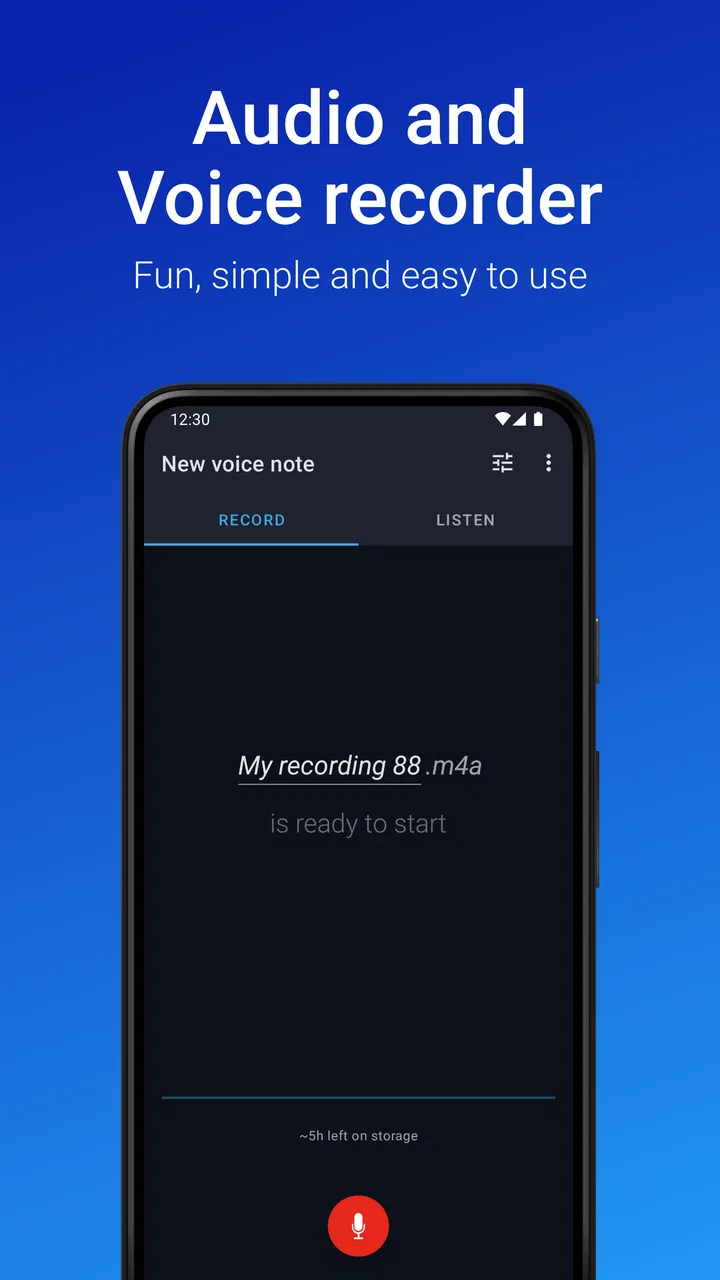
Easy Voice Recorder
- 4.7
- Rating
- 50.00M
- Installs
- Free
- Price
 Analysis by App-foxy
I started using Easy Voice Recorder because I wanted a quicker way to save thoughts before they disappeared. My usual alternative was typing into a notes app, which worked for short reminders but became awkward when I was walking, cooking, or trying to explain a complicated idea. A voice recorder is useful only when it fits naturally into the moment, and this app largely succeeds because it keeps that first step uncomplicated.
Developed by Digipom, it belongs to the productivity category rather than entertainment or professional audio production. That distinction matters. I see it as a practical capture tool: something for spoken reminders, rough ideas, personal notes, study material, and everyday moments that are easier to say than type. It is free to use, rated for Everyone, and has built a very large audience, with more than fifty million installs and a 4.7 average from roughly six hundred thousand ratings.
From forgotten thoughts to a usable recording habit
I find that a useful recording habit begins with a clear reason to speak rather than type: capturing a thought while it is still complete. This section looks at how a quick recording can become the first step in a practical workflow, and why a little structure at capture time makes the later review easier.
You May Also Like

 AccuWeather: Weather Radar
AccuWeather Review: A Quick, Clear Forecast for Everyday Decisions
For everyday plans, the best forecast is the one you can understand quickly. AccuWeather makes rain timing, radar, and local conditions easy to act on, with a few trade-offs.

 Hill Climb Racing
Why Hill Climb Racing Still Turns Crashes Into One More Run
A tiny car, a bumpy hill and one more upgrade: Hill Climb Racing keeps resurfacing because its simple chaos makes every near-miss feel personal.

 AliExpress - Shopping App
AliExpress Makes Global Shopping Feel Personal, but Shoppers Bear the Risk
AliExpress turns a global marketplace into a pocket-sized discovery engine. Its reach is useful, its shopping loop compelling, and its trade-offs easy to miss.

 Lords Mobile: Kingdom Wars
Lords Mobile Is a Kingdom-Building Routine, Not a Quick Match
A case-by-case verdict on the building, battles, device demands, and social commitments that make Lords Mobile rewarding for some players and exhausting for others.

 PDF Scanner app - TapScanner
TapScanner Makes Paperwork Easier to Capture, Check, and Share
TapScanner makes scanning with a phone feel less like a rescue operation and more like a dependable step in getting work done. Its capture tools are useful, though not flawless.

 Block Blast!
 Shows How Much a Puzzle Game Can Leave Out
A quiet grid game shows why puzzle players increasingly value instant clarity, repeatable skill and low-pressure play—and where the genre still needs to catch up.
More From Our News Desk
View All News


Why voice capture can improve a wider productivity system
Before installing it, my capture process was inconsistent. If an idea arrived while I was away from my desk, I would either trust my memory or type a few vague words into a note. Both options created work later. The memory approach lost details, while the text approach often produced fragments that made sense only at the time.
Easy Voice Recorder changes that first stage by letting me preserve the complete thought. I can explain what I mean instead of reducing it to a keyword. That is especially useful for planning an article, remembering a conversation, recording an instruction, or describing a problem that would take several typed sentences to explain.
The important point is that recording should not become the final destination for every idea. I get the most value when I treat each recording as temporary input for a larger system. After capturing something, I can listen back, decide whether it deserves action, and then move the useful part into my calendar, task list, or written notes. Without that second step, a voice recorder can simply become another place where information gets buried.
My practical rule is simple: record the thought in full, then give it a clear purpose. If it is a task, I turn it into a task. If it is background material, I keep it with the relevant project. If it is only a passing idea, I delete it instead of building an archive of clutter.
Starting a recording without breaking concentration
The app feels most effective when I use it for short, intentional captures rather than leaving it running as a passive notebook. I open it when I know speaking will be faster than typing, make the point, and stop. That keeps the recording easy to review and prevents a single file from becoming a long, confusing stream of unrelated thoughts.
A useful habit is to begin by saying what the recording is about. I might say, “article idea about simplifying morning routines,” followed by the actual thought. This spoken label makes later sorting easier because I do not have to guess why I created the file. It also reduces the temptation to replay several recordings just to identify them.
I would not rely on this method for situations where handling a phone is unsafe or distracting. Driving, cycling in traffic, and similar activities require attention elsewhere. The convenience of quick audio should not override basic safety.
Keeping recordings useful instead of creating an audio pile
Organization is where many voice tools become less helpful. A folder full of unnamed recordings may preserve information, but it does not make that information easy to retrieve. I recommend deciding on a small naming pattern and using it consistently. A title can include the topic and the intended next step, such as “budget question—check later” or “project idea—review Friday.”
I also find it useful to separate recordings by purpose in my own routine. Personal reminders, work ideas, study notes, and creative experiments should not all compete in one undifferentiated list. Even when the app makes capture simple, the surrounding organization still depends on the user. The recorder can preserve the material; it cannot decide which part deserves attention.
Another overlooked workflow is the “record, review, reduce” cycle. I record a thought, listen to it once when I have time, and reduce it to a written action or a short reference note. This prevents me from repeatedly replaying the same audio. It also exposes ideas that sounded important in the moment but do not justify further effort.
For study, I would use recordings as a supplement rather than a replacement for written revision. Speaking a summary after reading a section can reveal whether I actually understand it. Later, listening back helps me notice gaps, but written keywords are still faster when I need to compare concepts or search for a specific term.
A repeatable routine for everyday use
The most reliable routine I found has three stages. First, I capture immediately when the idea is fresh. Second, I review recordings during a planned quiet period instead of interrupting every activity to organize them. Third, I either convert the content into another system or remove it.
This schedule turns the app into part of a sustainable productivity system rather than a digital drawer. The capture stage is deliberately quick. The review stage is limited, so audio does not consume the whole day. The final stage keeps the list from expanding without control.
A realistic example is a commute as a passenger. I might remember three changes I want to make to a project. Instead of trying to hold them in my head, I make one focused recording and speak the changes in order. Later, I listen once, create the actual tasks, and discard the audio if it no longer has value. The recording served as a bridge between the idea and the actionable plan.
For household use, the same approach works with shopping or maintenance reminders. I can describe what needs replacing, where I noticed it, and what information I still need. That is more useful than a note saying only “fix the kitchen,” because the context survives the moment of capture.
I would avoid recording every minor thought automatically. Constant capture sounds productive, but it creates review debt. The app works better when I reserve it for information that benefits from tone, detail, speed, or hands-free expression.
What the app does well compared with typing and heavier audio tools
Compared with a standard notes app, the main advantage is speed of expression. I can speak naturally, include context, and keep moving. This is valuable for people who think aloud, users with limited time for typing, and anyone who regularly gets ideas away from a keyboard.
Compared with a full audio workstation, it is much less intimidating for ordinary recording. I do not want to configure a complex project when I only need to save a reminder or rough explanation. A focused recorder is easier to open with a specific purpose, and that lower friction makes it more likely that I will actually capture the idea.
There is a trade-off, though. A notes app is usually better for scanning, searching, editing, and rearranging information. A professional audio application is better when sound quality, detailed editing, mixing, or production control is central. Easy Voice Recorder sits between those extremes: more natural than typing for spoken material, but not a substitute for a complete written knowledge system or studio tool.
That middle position is its strength for everyday productivity and its boundary for specialized work. I would choose it for voice-first capture, not for producing a polished podcast, editing an interview into a finished program, or managing a large research archive where text search is essential.
Where the workflow can fail
The first failure point is forgetting to review. A recording can feel like progress because the thought is safely stored, but storage is not completion. If I do not schedule a review, the app becomes a collection of intentions. The solution is to connect recording review to an existing routine, such as planning the day or closing a work session.
The second problem is unclear audio context. A recording made in a noisy environment may be harder to understand later, especially if I speak too quietly or rush. I have learned to pause briefly, state the subject, and speak in complete phrases. That small discipline improves the usefulness of the file more than simply making more recordings.
The third issue is privacy awareness. I would be careful about recording other people, confidential conversations, private appointments, or sensitive work material. A convenient recorder does not remove the need for consent and responsible handling. Before capturing anything involving another person, I would make sure recording is appropriate in that situation.
There is also the practical question of storage and backup habits. Important recordings should not exist only as temporary phone content. If a recording contains irreplaceable information, I would move the essential details into a more durable system rather than assuming the audio file alone is a complete backup.
Finally, audio takes time to review. A written list can be scanned in seconds, while a spoken explanation must be played. This is why I keep recordings concise and convert important information into text. The app saves time at capture, but it can cost time later if I use it for material that would have been better written from the beginning.
Who will benefit most from adopting it
I think Easy Voice Recorder is a strong fit for people who frequently need to capture thoughts away from a desk. Students can use it to explain difficult topics in their own words, writers can preserve rough ideas before polishing them, and busy households can save detailed reminders without stopping to type. It is also useful for anyone who finds speaking more natural than writing during the early stage of planning.
It can suit users who want a simple free starting point rather than a complicated audio environment. The app is available at no purchase price, while optional in-app purchases range from around one dollar and fifty cents to about five dollars per item. I would decide about those extras only after using the basic workflow long enough to understand what I actually need.
The Everyone age rating also makes it approachable for a broad audience, although younger users should still follow household rules about privacy, device use, and recording other people. The app’s long presence, having been released in February 2012, and its large user base suggest that it is not a new experiment, but popularity alone should not determine whether it fits an individual routine.
I would recommend skipping it if your work depends mainly on searchable text, precise transcription, advanced audio editing, or formal production controls. In those cases, a notes system, transcription-focused tool, or dedicated audio editor may be a better primary choice. I would also skip it if you dislike reviewing audio or tend to collect information without processing it.
My practical recommendation
After using it as part of a broader routine, I see Easy Voice Recorder as a dependable front door for ideas. Its real value is not simply that it records sound; it is that it makes the first step of remembering, explaining, and preserving something less demanding. That advantage appears in small moments: a thought during a walk, a detailed reminder at home, or a project idea that would lose its shape if reduced to a few typed words.
My recommendation is to give it a defined job. Use it for quick voice capture, name recordings clearly, review them at a planned time, and move important information into the system where it will actually be used. If you follow that process, the app can reduce forgotten thoughts without creating an audio backlog.
The best reason to adopt it is not unlimited recording; it is a repeatable path from spoken thought to finished action. For that focused role, Digipom’s productivity app is easy to recommend. Just remember that the recorder handles capture, while the quality of the final system still depends on how deliberately you review and organize what you save.
FAQs for Easy Voice Recorder
01What features does Easy Voice Recorder offer?
Easy Voice Recorder provides a range of features including high-quality audio recording, the ability to record in different formats (such as MP3 and WAV), and easy sharing options. It also supports background recording, which allows you to use other apps while recording. The app is designed for simplicity and efficiency, making it ideal for students, professionals, and musicians.
02Is Easy Voice Recorder free to use?
Easy Voice Recorder offers a free version with basic features suitable for everyday use. However, there is a Pro version available for purchase that unlocks additional features such as stereo recording, volume boosting, and cloud integration. The Pro version is recommended for users who require more advanced functionality.
03How can I manage recordings with Easy Voice Recorder?
Managing recordings with Easy Voice Recorder is simple. The app allows you to organize recordings by date, title, or custom tags. You can also rename, delete, and share recordings directly from the app. For users who need more control, the Pro version offers the ability to trim and edit recordings within the app.
04Does Easy Voice Recorder support cloud storage integration?
Yes, Easy Voice Recorder Pro supports integration with popular cloud storage services such as Google Drive and Dropbox. This feature allows users to automatically back up their recordings to the cloud, ensuring they are stored securely and can be accessed from any device. The free version does not include cloud integration.
05Can I use Easy Voice Recorder for professional audio recording?
While Easy Voice Recorder is primarily designed for ease of use, the Pro version offers features that can be suitable for professional audio recording. These include adjustable bitrates for higher quality audio, stereo recording, and support for external microphones. However, for more complex audio production, dedicated professional recording software may be recommended.
Pros
- User-friendly interface for quick access.
- High-quality audio recording capabilities.
- Supports multiple file formats.
- Background recording feature available.
- Seamless integration with cloud services.
Cons
- Limited editing tools within the app.
- Some features locked behind a paywall.
- No advanced noise cancellation.
- Ads in the free version can be intrusive.
- Lacks direct transcription features.

Easy Voice Recorder
Gallery